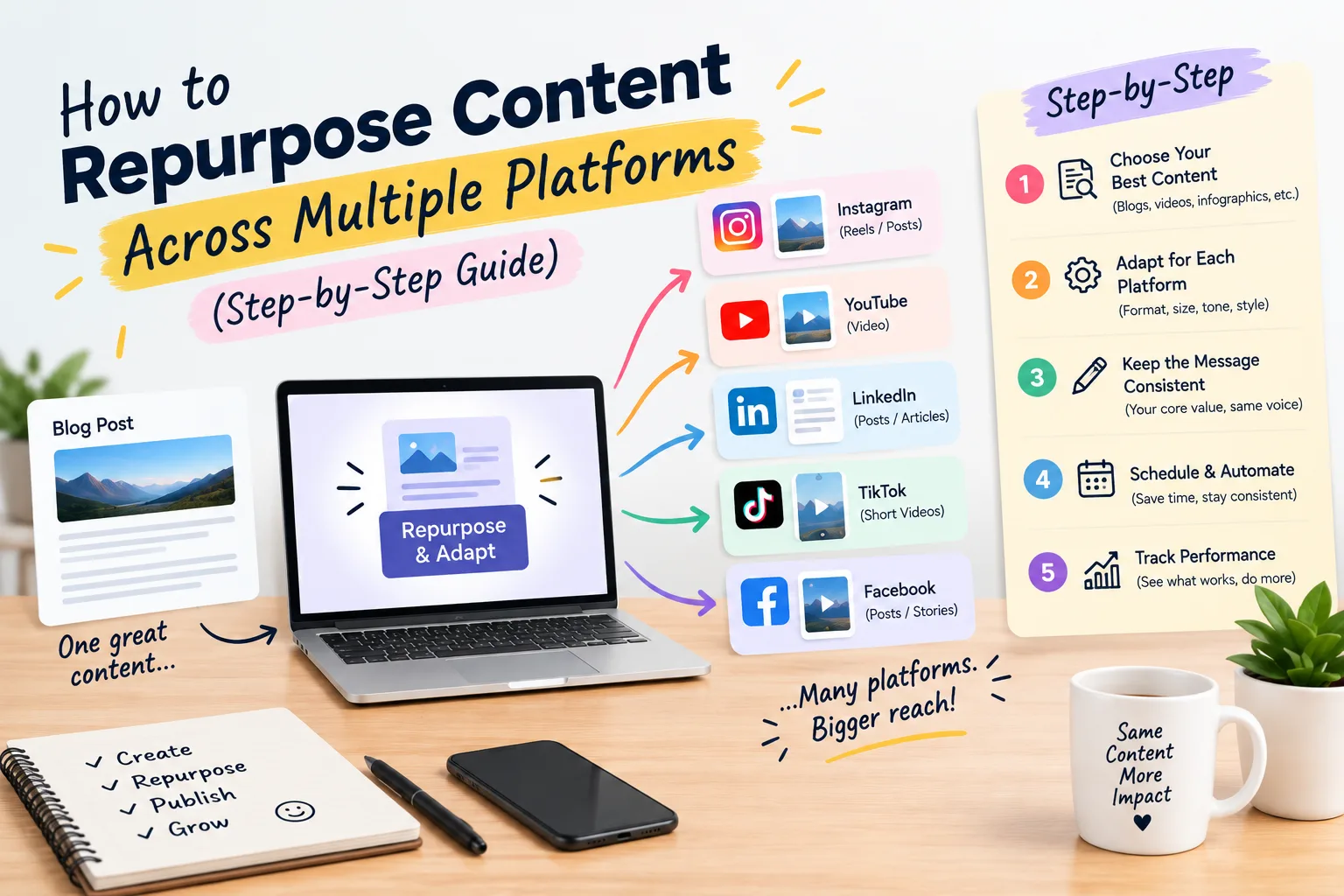
How to Repurpose Content Across Multiple Platforms (Step-by-Step Guide)
Creating fresh content for every platform is exhausting, and it isn’t necessary. If you learn to repurpose content the right way, one strong idea can fuel your blog, social media, email list, and video channels for weeks.
In this guide, you’ll learn what content repurposing is, why it works, and a simple process for turning a single piece of content into 10 or more assets.
What Is Content Repurposing?
Content repurposing means taking an existing piece of content and reshaping it into new formats for different platforms and audiences. It is not copy-pasting. You adapt the message to fit each platform’s style, length, and user intent.
For example, a 2,000-word blog post can become a LinkedIn carousel, a short video, an email newsletter, and a Pinterest infographic.
Why You Should Repurpose Content
- Saves time and budget: You research and create once, then distribute many times.
- Reaches new audiences: People consume content differently. Some read, some watch, and some listen.
- Strengthens your message: Repeating a core idea in different formats builds authority and recall.
- Improves SEO: More touchpoints mean more backlinks, branded searches, and traffic signals pointing to your main page.
- Extends content lifespan: Evergreen posts can keep working for months or years.
Step 1: Start With a High-Performing “Pillar” Piece
Don’t repurpose everything. Choose content that has already proven itself. Check Google Analytics or Search Console for posts with strong traffic, engagement, or conversions. Long-form pieces such as in-depth blog posts, webinars, podcasts, and YouTube videos make the best source material because they contain many smaller ideas.
Step 2: Break the Content Into Core Ideas
Read or watch your pillar piece and pull out:
- Key takeaways and main arguments
- Statistics and data points
- Quotable lines
- Step-by-step processes
- Common questions and answers
- Examples and case studies
Each of these can become its own standalone asset.
Step 3: Match Each Idea to the Right Platform
Every platform has its own audience expectations. Here is how to repurpose content across multiple platforms effectively:
| Platform | Format to Create | Best Used For |
|---|---|---|
| Carousel, text post, or short article | Professional insights, frameworks | |
| Reels, carousels, quote graphics | Visual tips, behind-the-scenes | |
| X (Twitter) | Threads, single-tip posts | Quick takeaways, discussion |
| YouTube | Full video, Shorts | Tutorials, deep dives |
| TikTok | Short vertical videos | Hooks, myths, quick tips |
| Infographics, idea pins | Evergreen how-to content | |
| Newsletter summary or mini-series | Nurturing and driving traffic | |
| Podcast | Audio version or discussion episode | Thought leadership |
| Medium / Substack | Republished article with canonical tag | Wider distribution |
Step 4: Adapt, Don’t Duplicate
Each version should feel native to its platform. Some practical adjustments:
- Change the hook. A blog headline rarely works as a Reel opener. Lead with a bold statement or question.
- Adjust length and tone. LinkedIn favors professional storytelling, TikTok favors fast and casual delivery.
- Use platform features. Add hashtags, captions, polls, or stickers where they fit.
- Add a clear call to action. Point readers back to the original post, your lead magnet, or your product.
Step 5: Real Content Repurposing Examples
Here is how one blog post can become 10 assets:
- A LinkedIn carousel summarizing the main steps
- A 60-second Reel or TikTok sharing the top tip
- An X thread with 7 key lessons
- An email newsletter with a short summary and a link
- A YouTube video walking through the topic
- A Pinterest infographic of the process
- Three quote graphics for Instagram Stories
- A podcast episode or audio narration
- A slide deck uploaded to SlideShare
- An FAQ section added back to the original post for featured snippet opportunities
Step 6: Use Tools to Speed Up the Process
You don’t need an expensive stack. Some helpful options:
- Canva: carousels, infographics, and quote graphics
- Descript or CapCut: video and podcast editing, auto-captions
- Opus Clip: turning long videos into short clips
- Otter.ai or Whisper: transcribing audio and video
- Buffer, Hootsuite, or Later: scheduling across platforms
- ChatGPT or Claude: drafting first versions of summaries, threads, and captions (always edit for your voice)
Step 7: Schedule and Space Out Your Content
Don’t publish everything on the same day. A simple distribution plan:
- Day 1: Publish the pillar post and send the newsletter
- Days 2–3: Share the LinkedIn carousel and X thread
- Days 4–7: Post short-form video and quote graphics
- Week 2: Publish the YouTube video or podcast episode
- Week 3 onward: Re-share evergreen pieces and update the original post
Step 8: Track Performance and Improve
Measure results for each platform, not just the original post. Track:
- Traffic back to your website
- Engagement (likes, comments, shares, saves)
- Email sign-ups or conversions
- Which formats and hooks perform best
Double down on the formats your audience responds to, and drop the ones that don’t.
Common Mistakes to Avoid
- Posting identical content everywhere. Platforms reward native, tailored content.
- Repurposing weak content. A poor post stays poor in every format.
- Ignoring SEO on republished articles. Use canonical tags when syndicating to avoid duplicate content issues.
- Forgetting the call to action. Every piece should lead somewhere.
- Skipping updates. Refresh old statistics and links before repurposing.
Frequently Asked Questions
Does repurposing content hurt SEO?
No, as long as you adapt the content and use canonical tags when republishing full articles on other sites. Search engines penalize low-value duplication, not smart reuse across different formats.
How often can I repurpose the same content?
Evergreen content can be refreshed and re-shared every few months. Change the angle, hook, or format each time.
What is the best content to repurpose?
Long-form, evergreen, and high-performing content such as guides, webinars, podcasts, case studies, and videos.
How many pieces can I create from one blog post?
Most blog posts can easily become 8 to 15 smaller assets, depending on length and depth.
1. Does repurposing content hurt SEO?
No, as long as you adapt the content and use canonical tags when republishing full articles on other sites. Search engines penalize low-value duplication, not smart reuse across different formats.
2. How often can I repurpose the same content?
Evergreen content can be refreshed and re-shared every few months. Change the angle, hook, or format each time.
3. What is the best content to repurpose?
Long-form, evergreen, and high-performing content such as guides, webinars, podcasts, case studies, and videos.
4. How many pieces can I create from one blog post?
Most blog posts can easily become 8 to 15 smaller assets, depending on length and depth.